스프링 배치
- 대용량 데이터를 끊기지 않고 안전하고 효율적으로 처리하기 위한 표준화 프레임워크
- 자동화할 '업무'를 대상으로 한다.
Job
- 배치 처리의 가장 큰 단위
Step
- Job을 수행할 세부 단계, 실행 단위
- 하나의 Job은 여러 Step으로 구성되어 있다.
Job Repository
- 배치 처리에 필요한 '메타 데이터'를 DB에 저장하고 관리하는 역할
- 메타 데이터 : 스프링 배치 실행에 대한 데이터 (Job의 시작 시간, Step의 실행 시간 ..)
Job Operator
- 스프링 배치 5에서는 Job Launcher라고 불렀다.
- 스프링 배치 운영 조작 인터페이스
- 스프링 배치에 대해 작업을 시작, 관리, 운영 등 조작할 수 있다.


@SpringBootApplication
public class BatchApplication {
    public static void main(String[] args) {
       System.exit(SpringApplication.exit(SpringApplication.run(BatchApplication.class, args)));
    }
}
System.exit(SpringApplication.exit(SpringApplication.run(BatchApplication.class, args)));
- SpringApplication.run의 결과를 exit 메서드에 전달하여 배치 종료 상태 코드(0: 성공, 1: 실패 등)를 OS에 전달
스프링 배치 작업은 개발자가 직접 실행하는 것이 아닌 '젠킨스', '에어 플로우', '리눅스의 Crontab' 등 외부 스케줄러가 실행한다.
- 외부 스케줄러는 Java Spring 코드 내부의 상세 로그를 전부 구체적으로 읽지는 않는다.
- 프로세스가 종료될 때 남긴 '종료 코드'만 확인 후 성공, 실패 판단 후 이후 로직 실행
- 배치 작업 중 오류가 발생하면 Spring 프로세스는 문제가 생겼다고 판단하여 OS에게 1(실패)를 전달하고, 외부 스케줄러는 실패 시 로직을 실행한다.
package spring.batch.cafeEx.config;

import lombok.RequiredArgsConstructor;
import org.springframework.batch.core.job.Job;
import org.springframework.batch.core.job.builder.JobBuilder;
import org.springframework.batch.core.repository.JobRepository;
import org.springframework.batch.core.step.Step;
import org.springframework.batch.core.step.builder.StepBuilder;
import org.springframework.batch.infrastructure.repeat.RepeatStatus;
import org.springframework.context.annotation.Bean;
import org.springframework.context.annotation.Configuration;
import org.springframework.transaction.PlatformTransactionManager;

@Configuration
@RequiredArgsConstructor
public class CafeJobConfig {

    private final JobRepository jobRepository; // 배치의 메타 데이터를 DB에 저장하는 repository
    private final PlatformTransactionManager txManager; // 배치 설계 시 트랜잭션이 필요할 때 사용

    @Bean // Job을 Bean으로 등록, 내부에서 Step 메서드들을 실행한다.
    public Job cafeJob() {
        return new JobBuilder("cafeJob", jobRepository)
                .start(step1())
                .next(step2())
                .next(step3())
                .build();
    }

    // 1. open cafe
    @Bean
    public Step step1() {
        return new StepBuilder("step1", jobRepository)
                .tasklet((contribution, chunkContext) -> {
                    System.out.println("[1] open cafe");
                    return RepeatStatus.FINISHED;
                }, txManager)
                .build();
    }

    // 2. make coffee
    int goal = 5; // 커피 5잔 완성을 목표
    int currentCount = 0; // 현재 커피 완성 개수

    @Bean
    public Step step2() {
        return new StepBuilder("step2", jobRepository)
                .tasklet((contribution, chunkContext) -> {
                    System.out.println("[2] make coffee");
                    currentCount++;
                    System.out.println("[2] current coffee count : " + currentCount);

                    if (currentCount < goal) { // 5잔을 완성하지 않았을 경우
                        return RepeatStatus.CONTINUABLE;
                    }

                    return RepeatStatus.FINISHED;
                }, txManager)
                .build();
    }

    // 3. get off work
    @Bean
    public Step step3() {
        return new StepBuilder("step3", jobRepository)
                .tasklet((contribution, chunkContext) -> {
                    System.out.println("[3] get off work");
                    return RepeatStatus.FINISHED;
                }, txManager)
                .build();
    }
}
new StepBuilder(step 이름, jobRepository)
.tasklet (수행할 작업, transactionManager)
step 생성 방법 : tasklet, chunk 두 방식으로 step 생성 가능
- tasklet : 단순하고 독립적인 작업의 처리 방식
- chunck : 크고 복잡한 작업의 처리 방식
tasklet 방식
(contribution, chunkContext) -> {
수행할 작업 ...
return RepeatStatus. //
}
RepeatStatus.FINISHED : step을 이 곳에서 종료
RepeatStatus.CONTINUABLE : step을 이어서 실행
./gradlew bootRun --args='--spring.batch.job.name=cafeJob'
터미널에서 입력 시 배치 작업 실행
여러 Job들 중 특정 Job만 선택 후 실행하는 터미널 명령어

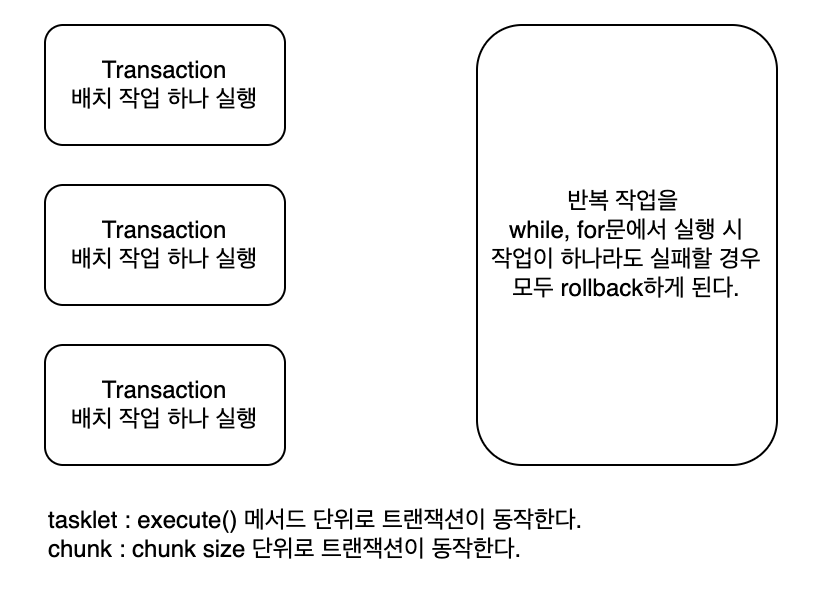
트랜잭션 동작
- 스프링 배치 사용 시 각 배치 작업 단위로 트랜잭션이 동작
- for, while문 사용 시 for, while 구문 자체가 하나의 트랜잭션으로 동작
트랜잭션이 필요없는 동작을 배치로 실행할 경우
ResourceLessTransactionManager
- 실제 DB와 연결되지 않은 트랜잭션 매니저
- 스프링 배치가 동작하기 위해 형식적으로 필요한 트랜잭션 관리자 역할을 수행
- 실제 DB의 Commit, Rollback을 수행하지 x
new ResourceLessTransactionManager()을 파라미터로 전달한다.
return new StepBuilder("step1", jobRepository)
        .tasklet((contribution, chunkContext) -> {
            System.out.println("[1] open cafe");
            return RepeatStatus.FINISHED;
        }, new ResourceLessTransactionManager())
        .build();
'Java & Spring > Batch' 카테고리의 다른 글
| [Spring] Batch 6 (0) | 2026.02.26 |
|---|---|
| [Spring] Batch 5 (0) | 2026.02.25 |
| [Spring] Batch 4 (0) | 2026.02.25 |
| [Spring] Batch 3 (0) | 2026.02.25 |
| [Spring] Batch 2 (0) | 2026.02.25 |