ResponseEntity
Spring Framework에서 제공하는 클래스
HTTP 응답의 전체 구성 요소를 개발자가 직접 제어할 수 있게 도와주는 '봉투' 역할
HTTP 응답의 구성
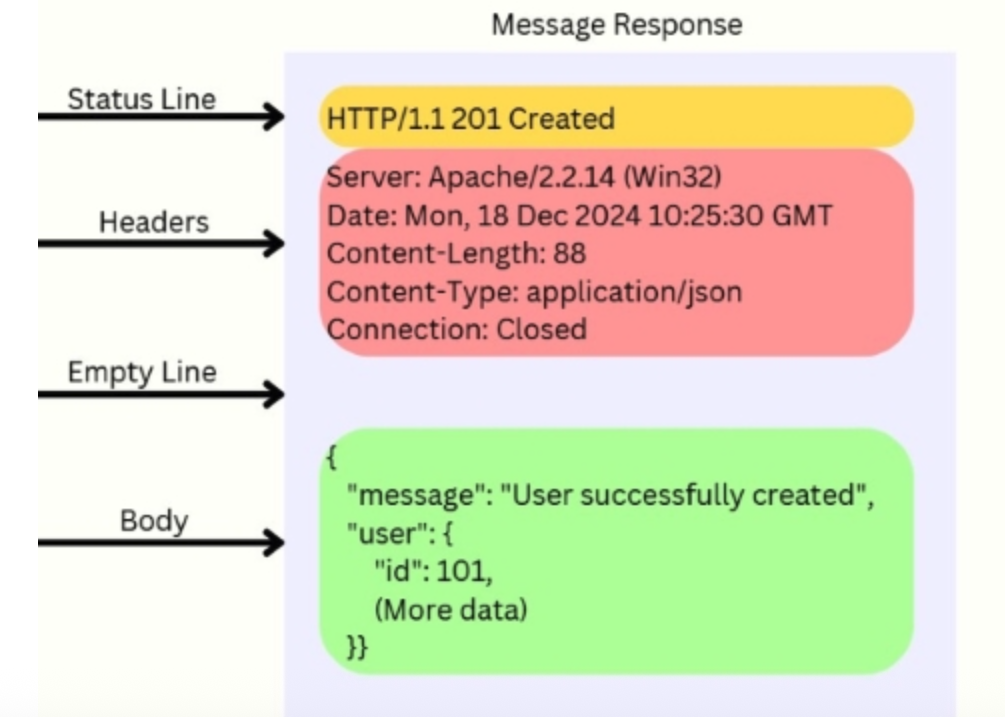
Status Line, Code: 응답 상태 (200 OK, 404 Not Found, 500 Error 등)
Headers: 응답에 대한 메타 데이터 (Content-Type, 인증 정보 등)
Body: 실제 전달할 데이터 (JSON, HTML, 텍스트 등)
@GetMapping("/history/{roomId}")
public ResponseEntity<?> getChatHistory(@PathVariable Long roomId) {

    List<ChatMessageDto> dtos = chatService.getChatHistory(roomId);

    return new ResponseEntity<>(dtos, HttpStatus.OK);
}
new ResponseEntity<>(실제 전달할 데이터, 상태 코드)
new ResponseEntity<>(데이터, HttpStatus.--)
=> 과거 버전의 스프링에서 ResponseEntity 객체를 전달하는 방법
HttpStatus.OK (200): 요청을 성공적으로 처리 완료 (조회, 수정 등 일반적인 성공)
HttpStatus.CREATED (201): 요청을 성공적으로 처리하여 새로운 리소스 생성 (회원가입 완료, 게시글 작성 완료 등)
HttpStatus.NO_CONTENT (204): 요청을 성공적으로 처리했으나 클라이언트에게 돌려줄 데이터(Body)가 없는 상태 (삭제 완료 등)
@PostMapping("/room/{roomId}/read")
public ResponseEntity<?> messageRead(@PathVariable Long roomId) {

    chatService.messageRead(roomId);


    return ResponseEntity.ok().build();
}
ResponseEntity.ok().build() : 전송할 데이터가 없을 때 전송
ResponseEntity.ok(전송할 데이터) : 데이터를 응답 객체에 담아 간편하게 전송
ResponseEntity.ok().body(전송할 데이터) : 데이터를 응답 객체에 담아 상세하게 전송
return ResponseEntity
    .ok()
    .build();

return ResponseEntity
    .status(HttpStatus.CREATED)
    .body(savedUser);   // body에 데이터를 넣은 뒤 자동으로 build()가 동작한다.


return ResponseEntity
    .ok()
    .header("Custom-Header", "foo") // 헤더 정보를 넣어 응답 반환
.body(전송할 데이터);'Java & Spring' 카테고리의 다른 글
| [Spring] JPA 6 (0) | 2026.03.16 |
|---|---|
| [Java] Map 정렬 (0) | 2026.03.03 |
| [Servlet] WebSocket (0) | 2026.02.16 |
| [Spring] Security (0) | 2026.02.15 |
| [Java] Reflection (0) | 2026.01.01 |